

Step Jobs with Flows in BullMQ




Step Jobs with Flows in BullMQ
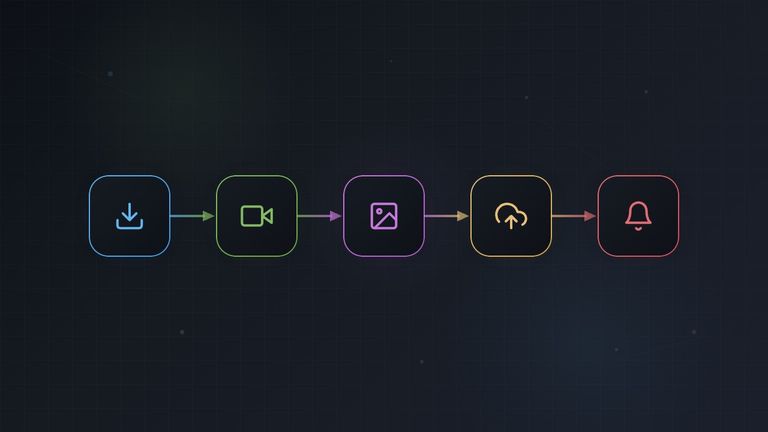
Some jobs are really several operations in sequence: download a file, transform it, upload the result, send a notification. When you put all of that in a single processor, any failure in the last step forces you to redo everything from scratch, and you cannot tell at a glance which step a job is stuck on.
BullMQ's Flow feature solves this by letting you model each step as its own job, linked together in a parent-child chain. Each step runs independently, with its own retries, its own logs, and its own status, while the flow guarantees they execute in order.
In this article we will cover:
- Why step jobs are useful compared to monolithic processors
- How to model sequential steps as a nested flow
- Passing data between steps using
getChildrenValues() - Dynamic flows where steps are determined at runtime
- Error handling and partial progress
The Problem with Monolithic Jobs
Consider a job that processes a user-uploaded video:
- Download the raw file from S3
- Transcode it to the target format
- Generate a thumbnail
- Upload the results back to S3
- Notify the user via email
A naive implementation puts everything in one processor:
const worker = new Worker(
  "video-pipeline",
  async (job) => {
    const file = await downloadFromS3(job.data.s3Key);
    const transcoded = await transcode(file, "mp4");
    const thumbnail = await generateThumbnail(transcoded);
    await uploadToS3(transcoded, thumbnail);
    await notifyUser(job.data.userId, job.data.videoId);
    return { status: "complete" };
  },
  { connection },
);
This works, but has several problems:
- Wasted work on failure. If the upload step fails after a 10-minute transcode, the entire job retries from scratch, re-downloading and re-transcoding.
- No visibility. From the outside, the job is either "active" or "completed". You can't tell whether it's stuck on the download or the transcode.
- One retry policy for everything. Maybe the download should retry 5 times with exponential backoff, but the notification should only retry once. A monolithic job forces a single retry configuration.
- Resource conflicts. The transcode step is CPU-heavy, so you want few concurrent workers. But the download step is I/O-bound and could run with high concurrency. In a monolithic job, the concurrency setting applies to the whole pipeline.
Flows: Sequential Steps as Nested Children
BullMQ flows let you express dependencies between jobs. A parent job will not start processing until all its children have completed successfully. By nesting children one level deep at a time, you create a chain, each step waits for the previous one:
step-5 (notify)          ← parent, runs last
  └─ step-4 (upload)     ← runs after step-3
       └─ step-3 (thumbnail)  ← runs after step-2
            └─ step-2 (transcode)  ← runs after step-1
                 └─ step-1 (download)  ← runs first (leaf node)
The deepest child (the leaf) runs first because it has no dependencies. When it completes, its parent becomes eligible. This continues up the chain until the root job runs last.
Creating the Flow
Use FlowProducer to add the entire chain atomically, either all jobs are created or none:
import { FlowProducer } from 'bullmq';

const flowProducer = new FlowProducer({ connection });

const flow = await flowProducer.add({
  name: 'notify',
  queueName: 'video-pipeline',
  data: { userId: 'user-42', videoId: 'vid-123' },
  children: [
    {
      name: 'upload',
      queueName: 'video-pipeline',
      data: { videoId: 'vid-123' },
      children: [
        {
          name: 'thumbnail',
          queueName: 'video-pipeline',
          data: { videoId: 'vid-123' },
          children: [
            {
              name: 'transcode',
              queueName: 'video-pipeline',
              data: { videoId: 'vid-123', format: 'mp4' },
              children: [
                {
                  name: 'download',
                  queueName: 'video-pipeline',
                  data: { s3Key: 'uploads/raw/vid-123.mov' },
                },
              ],
            },
          ],
        },
      ],
    },
  ],
});from bullmq import FlowProducer
flow_producer = FlowProducer(redisOpts={"host": "localhost", "port": 6379})
flow = await flow_producer.add({
"name": "notify",
"queueName": "video-pipeline",
"data": {"userId": "user-42", "videoId": "vid-123"},
"children": [
{
"name": "upload",
"queueName": "video-pipeline",
"data": {"videoId": "vid-123"},
"children": [
{
"name": "thumbnail",
"queueName": "video-pipeline",
"data": {"videoId": "vid-123"},
"children": [
{
"name": "transcode",
"queueName": "video-pipeline",
"data": {"videoId": "vid-123", "format": "mp4"},
"children": [
{
"name": "download",
"queueName": "video-pipeline",
"data": {"s3Key": "uploads/raw/vid-123.mov"},
},
],
},
],
},
],
},
],
}){:ok, flow} = BullMQ.FlowProducer.add(
%{
name: "notify",
queue_name: "video-pipeline",
data: %{userId: "user-42", videoId: "vid-123"},
children: [
%{
name: "upload",
queue_name: "video-pipeline",
data: %{videoId: "vid-123"},
children: [
%{
name: "thumbnail",
queue_name: "video-pipeline",
data: %{videoId: "vid-123"},
children: [
%{
name: "transcode",
queue_name: "video-pipeline",
data: %{videoId: "vid-123", format: "mp4"},
children: [
%{
name: "download",
queue_name: "video-pipeline",
data: %{s3Key: "uploads/raw/vid-123.mov"},
},
],
},
],
},
],
},
],
},
connection: :redis
)The execution order is: download → transcode → thumbnail → upload → notify.
Processing Each Step
A single worker can handle all steps by switching on the job name:
import { Worker } from 'bullmq';

const worker = new Worker('video-pipeline', async (job) => {
  switch (job.name) {
    case 'download':
      return await handleDownload(job);
    case 'transcode':
      return await handleTranscode(job);
    case 'thumbnail':
      return await handleThumbnail(job);
    case 'upload':
      return await handleUpload(job);
    case 'notify':
      return await handleNotify(job);
    default:
      throw new Error(`Unknown step: ${job.name}`);
  }
}, { connection });from bullmq import Worker
async def process(job, token):
if job.name == "download":
return await handle_download(job)
elif job.name == "transcode":
return await handle_transcode(job)
elif job.name == "thumbnail":
return await handle_thumbnail(job)
elif job.name == "upload":
return await handle_upload(job)
elif job.name == "notify":
return await handle_notify(job)
else:
raise Exception(f"Unknown step: {job.name}")
worker = Worker("video-pipeline", process, {
"connection": {"host": "localhost", "port": 6379}
})defmodule VideoPipeline do
def process(%BullMQ.Job{name: "download"} = job), do: handle_download(job)
def process(%BullMQ.Job{name: "transcode"} = job), do: handle_transcode(job)
def process(%BullMQ.Job{name: "thumbnail"} = job), do: handle_thumbnail(job)
def process(%BullMQ.Job{name: "upload"} = job), do: handle_upload(job)
def process(%BullMQ.Job{name: "notify"} = job), do: handle_notify(job)
end
{:ok, _worker} = BullMQ.Worker.start_link(
queue: "video-pipeline",
connection: :redis,
processor: &VideoPipeline.process/1
)Or if you prefer, use separate queues for each step. This lets you assign different
concurrency settings and different worker pools to I/O-bound vs CPU-bound steps:
const flow = await flowProducer.add({
  name: "notify",
  queueName: "notifications",
  data: { userId: "user-42", videoId: "vid-123" },
  children: [
    {
      name: "upload",
      queueName: "uploads",
      // ...nested children with different queueNames
    },
  ],
});import { Worker } from 'bullmq';
const downloadWorker = new Worker('downloads', handleDownload, {
connection,
concurrency: 20, // I/O-bound, high concurrency
});
const mediaWorker = new Worker('media-processing', async (job) => {
switch (job.name) {
case 'transcode': return await handleTranscode(job);
case 'thumbnail': return await handleThumbnail(job);
}
}, {
connection,
concurrency: 2, // CPU-bound, low concurrency
});
const uploadWorker = new Worker('uploads', handleUpload, {
connection,
concurrency: 10,
});
const notifyWorker = new Worker('notifications', handleNotify, {
connection,
concurrency: 50,
});from bullmq import Worker
download_worker = Worker("downloads", handle_download, {
"connection": connection,
"concurrency": 20, # I/O-bound, high concurrency
})
async def process_media(job, token):
if job.name == "transcode":
return await handle_transcode(job)
elif job.name == "thumbnail":
return await handle_thumbnail(job)
media_worker = Worker("media-processing", process_media, {
"connection": connection,
"concurrency": 2, # CPU-bound, low concurrency
})
upload_worker = Worker("uploads", handle_upload, {
"connection": connection,
"concurrency": 10,
})
notify_worker = Worker("notifications", handle_notify, {
"connection": connection,
"concurrency": 50,
})# In your application's supervision tree
children = [
{BullMQ.Worker,
queue: "downloads", connection: :redis,
processor: &handle_download/1, concurrency: 20},
{BullMQ.Worker,
queue: "media-processing", connection: :redis,
processor: &MediaProcessor.process/1, concurrency: 2},
{BullMQ.Worker,
queue: "uploads", connection: :redis,
processor: &handle_upload/1, concurrency: 10},
{BullMQ.Worker,
queue: "notifications", connection: :redis,
processor: &handle_notify/1, concurrency: 50},
]
Supervisor.start_link(children, strategy: :one_for_one)Passing Data Between Steps
Each step's return value is available to its parent via getChildrenValues(). This is how the output of one step becomes the input for the next.
async function handleDownload(job) {
  const localPath = await downloadFromS3(job.data.s3Key);
  // Return value is stored and accessible by the parent (transcode)
  return { localPath };
}

async function handleTranscode(job) {
  // Get results from child jobs (download step)
  const childrenValues = await job.getChildrenValues();

  // childrenValues is keyed by the fully qualified job key
  // For a single child, just grab the first value
  const downloadResult = Object.values(childrenValues)[0];

  const outputPath = await transcode(downloadResult.localPath, job.data.format);
  return { outputPath };
}

async function handleThumbnail(job) {
  const childrenValues = await job.getChildrenValues();
  const transcodeResult = Object.values(childrenValues)[0];

  const thumbnailPath = await generateThumbnail(transcodeResult.outputPath);
  return { thumbnailPath, videoPath: transcodeResult.outputPath };
}

async function handleUpload(job) {
  const childrenValues = await job.getChildrenValues();
  const thumbnailResult = Object.values(childrenValues)[0];

  const videoUrl = await uploadToS3(thumbnailResult.videoPath);
  const thumbUrl = await uploadToS3(thumbnailResult.thumbnailPath);
  return { videoUrl, thumbUrl };
}

async function handleNotify(job) {
  const childrenValues = await job.getChildrenValues();
  const uploadResult = Object.values(childrenValues)[0];

  await sendEmail(job.data.userId, {
    videoUrl: uploadResult.videoUrl,
    thumbnailUrl: uploadResult.thumbUrl,
  });
  return { notified: true };
}async def handle_download(job, token):
local_path = await download_from_s3(job.data["s3Key"])
# Return value is stored and accessible by the parent (transcode)
return {"localPath": local_path}
async def handle_transcode(job, token):
# Get results from child jobs (download step)
children_values = await job.getChildrenValues()
# children_values is keyed by the fully qualified job key
# For a single child, just grab the first value
download_result = list(children_values.values())[0]
output_path = await transcode(download_result["localPath"], job.data["format"])
return {"outputPath": output_path}
async def handle_thumbnail(job, token):
children_values = await job.getChildrenValues()
transcode_result = list(children_values.values())[0]
thumbnail_path = await generate_thumbnail(transcode_result["outputPath"])
return {"thumbnailPath": thumbnail_path, "videoPath": transcode_result["outputPath"]}
async def handle_upload(job, token):
children_values = await job.getChildrenValues()
thumbnail_result = list(children_values.values())[0]
video_url = await upload_to_s3(thumbnail_result["videoPath"])
thumb_url = await upload_to_s3(thumbnail_result["thumbnailPath"])
return {"videoUrl": video_url, "thumbUrl": thumb_url}
async def handle_notify(job, token):
children_values = await job.getChildrenValues()
upload_result = list(children_values.values())[0]
await send_email(job.data["userId"], {
"videoUrl": upload_result["videoUrl"],
"thumbnailUrl": upload_result["thumbUrl"],
})
return {"notified": True}defmodule VideoPipeline do
def handle_download(%BullMQ.Job{data: data}) do
local_path = download_from_s3(data["s3Key"])
# Return value is stored and accessible by the parent (transcode)
{:ok, %{localPath: local_path}}
end
def handle_transcode(%BullMQ.Job{} = job) do
# Get results from child jobs (download step)
{:ok, children_values} = BullMQ.Job.get_children_values(job)
# children_values is keyed by the fully qualified job key
# For a single child, just grab the first value
[download_result | _] = Map.values(children_values)
output_path = transcode(download_result["localPath"], job.data["format"])
{:ok, %{outputPath: output_path}}
end
def handle_thumbnail(%BullMQ.Job{} = job) do
{:ok, children_values} = BullMQ.Job.get_children_values(job)
[transcode_result | _] = Map.values(children_values)
thumbnail_path = generate_thumbnail(transcode_result["outputPath"])
{:ok, %{thumbnailPath: thumbnail_path, videoPath: transcode_result["outputPath"]}}
end
def handle_upload(%BullMQ.Job{} = job) do
{:ok, children_values} = BullMQ.Job.get_children_values(job)
[thumbnail_result | _] = Map.values(children_values)
video_url = upload_to_s3(thumbnail_result["videoPath"])
thumb_url = upload_to_s3(thumbnail_result["thumbnailPath"])
{:ok, %{videoUrl: video_url, thumbUrl: thumb_url}}
end
def handle_notify(%BullMQ.Job{} = job) do
{:ok, children_values} = BullMQ.Job.get_children_values(job)
[upload_result | _] = Map.values(children_values)
send_email(job.data["userId"], %{
videoUrl: upload_result["videoUrl"],
thumbnailUrl: upload_result["thumbUrl"]
})
{:ok, %{notified: true}}
end
endSince each step in a linear chain has exactly one child, Object.values(childrenValues)[0] (or its equivalent in your language) is a simple way to get the previous step's result.
Dynamic Flows
Sometimes you don't know the steps upfront. Maybe the pipeline depends on the file type, or certain steps are conditional. You can build the flow tree programmatically:
import { FlowProducer } from 'bullmq';

interface StepDefinition {
  name: string;
  queueName: string;
  data: Record<string, any>;
}

function buildStepChain(steps: StepDefinition[]) {
  // Steps are listed in execution order: first step runs first.
  // We build the nested structure bottom-up (leaf = first step).
  let chain: any = undefined;

  // Iterate in reverse to nest from the last step inward
  for (let i = steps.length - 1; i >= 0; i--) {
    const step = steps[i];
    chain = {
      name: step.name,
      queueName: step.queueName,
      data: step.data,
      ...(chain ? { children: [chain] } : {}),
    };
  }

  return chain;
}

// Usage
const flowProducer = new FlowProducer({ connection });

const steps: StepDefinition[] = [
  { name: 'download', queueName: 'pipeline', data: { s3Key: 'raw/vid.mov' } },
  { name: 'transcode', queueName: 'pipeline', data: { format: 'mp4' } },
  { name: 'upload', queueName: 'pipeline', data: { bucket: 'output' } },
];

// Conditionally add a notification step
if (shouldNotify) {
  steps.push({ name: 'notify', queueName: 'pipeline', data: { userId: 'u-1' } });
}

const flow = await flowProducer.add(buildStepChain(steps));from bullmq import FlowProducer
def build_step_chain(steps):
"""Build a nested flow from a flat list of steps (first runs first)."""
chain = None
for step in reversed(steps):
node = {
"name": step["name"],
"queueName": step["queueName"],
"data": step["data"],
}
if chain:
node["children"] = [chain]
chain = node
return chain
# Usage
flow_producer = FlowProducer(redisOpts={"host": "localhost", "port": 6379})
steps = [
{"name": "download", "queueName": "pipeline", "data": {"s3Key": "raw/vid.mov"}},
{"name": "transcode", "queueName": "pipeline", "data": {"format": "mp4"}},
{"name": "upload", "queueName": "pipeline", "data": {"bucket": "output"}},
]
# Conditionally add a notification step
if should_notify:
steps.append({"name": "notify", "queueName": "pipeline", "data": {"userId": "u-1"}})
flow = await flow_producer.add(build_step_chain(steps))defmodule StepChain do
@doc "Build a nested flow from a flat list of steps (first runs first)."
def build(steps) do
steps
|> Enum.reverse()
|> Enum.reduce(nil, fn step, chain ->
node = %{
name: step.name,
queue_name: step.queue_name,
data: step.data
}
if chain, do: Map.put(node, :children, [chain]), else: node
end)
end
end
# Usage
steps = [
%{name: "download", queue_name: "pipeline", data: %{s3Key: "raw/vid.mov"}},
%{name: "transcode", queue_name: "pipeline", data: %{format: "mp4"}},
%{name: "upload", queue_name: "pipeline", data: %{bucket: "output"}},
]
steps = if should_notify do
steps ++ [%{name: "notify", queue_name: "pipeline", data: %{userId: "u-1"}}]
else
steps
end
{:ok, flow} = BullMQ.FlowProducer.add(
StepChain.build(steps),
connection: :redis
)The buildStepChain helper takes a flat list of steps in execution order and builds the nested structure that FlowProducer expects.
Error Handling and Partial Progress
One of the main advantages of step jobs is that failures are scoped to a single step.
If the upload step fails after a successful transcode, only the upload step retries, the transcode result is preserved as the completed child's return value.
Per-Step Retry Configuration
Each job in the flow can have its own retry settings:
const flow = await flowProducer.add({
  name: 'notify',
  queueName: 'pipeline',
  data: { userId: 'user-42' },
  opts: {
    attempts: 2,
    backoff: { type: 'fixed', delay: 5000 },
  },
  children: [
    {
      name: 'upload',
      queueName: 'pipeline',
      data: { bucket: 'output' },
      opts: {
        attempts: 5,
        backoff: { type: 'exponential', delay: 1000 },
      },
      children: [
        {
          name: 'download',
          queueName: 'pipeline',
          data: { s3Key: 'raw/vid.mov' },
          opts: {
            attempts: 5,
            backoff: { type: 'exponential', delay: 1000 },
          },
        },
      ],
    },
  ],
});flow = await flow_producer.add({
"name": "notify",
"queueName": "pipeline",
"data": {"userId": "user-42"},
"opts": {
"attempts": 2,
"backoff": {"type": "fixed", "delay": 5000},
},
"children": [
{
"name": "upload",
"queueName": "pipeline",
"data": {"bucket": "output"},
"opts": {
"attempts": 5,
"backoff": {"type": "exponential", "delay": 1000},
},
"children": [
{
"name": "download",
"queueName": "pipeline",
"data": {"s3Key": "raw/vid.mov"},
"opts": {
"attempts": 5,
"backoff": {"type": "exponential", "delay": 1000},
},
},
],
},
],
}){:ok, flow} = BullMQ.FlowProducer.add(
%{
name: "notify",
queue_name: "pipeline",
data: %{userId: "user-42"},
opts: %{
attempts: 2,
backoff: %{type: "fixed", delay: 5000}
},
children: [
%{
name: "upload",
queue_name: "pipeline",
data: %{bucket: "output"},
opts: %{
attempts: 5,
backoff: %{type: "exponential", delay: 1000}
},
children: [
%{
name: "download",
queue_name: "pipeline",
data: %{s3Key: "raw/vid.mov"},
opts: %{
attempts: 5,
backoff: %{type: "exponential", delay: 1000}
},
},
],
},
],
},
connection: :redis
)Observing Step Progress
Since each step is a regular BullMQ job, you can inspect it with the standard APIs:
import { Queue } from "bullmq";

const queue = new Queue("pipeline", { connection });

// Get all active jobs to see which step is currently running
const active = await queue.getActive();
active.forEach((job) => {
  console.log(`Step "${job.name}" is active (job ${job.id})`);
});

// Get failed jobs to find which step broke
const failed = await queue.getFailed();
failed.forEach((job) => {
  console.log(`Step "${job.name}" failed: ${job.failedReason}`);
});
You can also use the waiting-children state to see which parent step is waiting for its predecessor to complete:
const waitingChildren = await queue.getWaitingChildren();
waitingChildren.forEach((job) => {
  console.log(`Step "${job.name}" waiting for children to complete`);
});
When to Use Step Jobs vs Monolithic Jobs
Step jobs via flows are not always the right choice. Here is a quick summary:
| Scenario | Recommendation |
|---|---|
| Job takes < 1 second total | Monolithic, overhead of flows isn't worth it |
| Steps have different retry needs | Step jobs, each step has its own attempts and backoff |
| You need visibility into which step failed | Step jobs, each step has its own status and logs |
| Steps need different concurrency / worker pools | Step jobs with separate queues |
| Steps can run in parallel | Flow with multiple children at the same level |
| Simple, fast, uniform work | Monolithic, simpler to reason about |
Best Practices
-
Return only serializable data from each step. The return value is stored in Redis and passed to the parent via
getChildrenValues(). Keep it small, return file paths or URLs, not file contents. -
Use the
buildStepChainhelper for dynamic pipelines. It is easier to reason about a flat list than a deeply nested structure. -
Separate queues for heterogeneous steps. If some steps are CPU-bound and others are I/O-bound, separate queues let you tune concurrency independently.
-
Use
removeOnCompleteto keep Redis clean. Steps in a completed flow are no longer needed. SetremoveOnComplete: trueon each step's options, or configure it as a queue default viaqueuesOptionson theFlowProducer.add()call. -
Monitor the
waiting-childrenstate. This tells you at a glance where in the pipeline the flow is everything below thewaiting-childrenjob has been processed, and the next step is either active or waiting.
What's Next
This article covered sequential step jobs, each step depends on exactly one predecessor. But flows also support fan-out patterns where a parent waits for multiple children to complete in parallel. You can combine both patterns: some steps run in sequence, while others fan out and converge. See the Flows documentation for more on tree-shaped flows.
Ready to try flows? Check out the FlowProducer API reference
and the Flows guide in the official documentation.